Monday, January 11, 2016

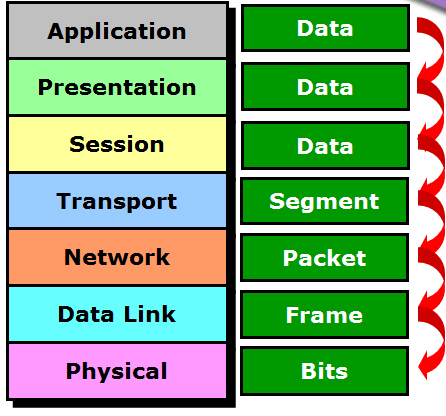
Explain the OSI ( Open Systems Interconnection ) reference model with diagram?

Solution:-

OSI means open System Interconnect model. It was developed by the International organization for standardization in 1974. It consists of seven layer, each layer has specific processing function. Figure below.......


1. Application layer: It is responsible for providing network services to the user. It is also known as desktop layer.
2. Presentation layer: It is responsible for concerting data into standard format. eg. ASCII, JPG, MPG, BMP.
3. Session layer: It is responsible for establishing maintaining and terminating session. Session ID work at session layer.
RPC- Remote procedure call
SQL- Structured query language
NFS- Network File System
4. Transport layer: It is responsible for end- to- end connectivity. It is also known as the heart of OSI layers. Following tasks are performed at transport layer:
                i. Indentifying service
                ii. Multiplexing and De-multiplexing
                iii. Segmentation
                iv. Sequencing and reassembling
    v. Error correction
    vi. Flow control
5. Network layer: It is responsible for providing best path for data to reach the destination. Logical addressing works on this layer. Router is a Network layer device.
6. Data link layer: It is divided into two sub layers.
a. LLC: Logical link control which talks about WAN protocols.
b. MAC: Media Access Control which talk about physical address. It is responsible for error detection also.
7. Physical layer:  It is responsible for electrical mechanical and procedural checks. Data will be converted into Binary (i.e.) O's and I's devices working at physical layer are Hubs, Repeaters, cable, Modem etc.

How to add (sum) two numbers in Visual Studio ?


Sunday, January 10, 2016

Practicsl Question HTML.......


1. BASICS OF HTML - I

a. Create a simple html page to demonstrate the basic structural tags of HTML
b. Create a html page to demonstrate the usage of 10 physical and 10 logical
     text formatting tags.
c. Prepare a html page to display the syntax and usage of any 10 text formatting tags.

2. BASICS OF HTML - 2

a. Create a html page to display your class time table using <pre>......</pre> tag. (Do not use table).
b. Create a html page to write brief description about yourself using header tags, paragraph tag and text formatting tags.

3. IMAGES IN HTML

a. Create an image gallery of any three popular places in Nepal along with their
     short description with the images aligned in left or right.
b. Demonstrate the use of align, vspace and hspace attribute using minimum of four images.

4. LINKS IN HTML

a. Create a webpage to containing brief description about your college and links to your
     college and university website.
b. Demonstrate the use of top to bottom and bottom to top using two anchor tags.

5. LISTS IN HTML

a. Create the following list using html.

1.       MBIS
2.       BBIS
a.        Semester 1
§ Subject 1
§ Subject 2
§ Subject 3
b.       Semester 2
c.        Semester 3
3.       BHTM

b. Create the following list using html

                A. Movies
                                i.   Nepali
                                ii.  Hindi
                                iv. English
                C. Music
                D. Travel
                B. Reading
                E. Social Networking
                F. Chatting

 
6. FORMS IN HTML

a. Design a html form to demonstrate the 10 different types of controls generated using
     INPUT tag.

b. Design a html form to submit a job application form. Demonstrate the use of drop-down
     list, textareas and file upload control.


Saturday, January 09, 2016

What do you mean by Common Language Runtime (CLR)?

Solution:-
            The Common Language Runtime (CLR), is the runtime environment of the .NET framework, which manages the execution of code and provides services. It has five components namely:
·        CTS - Common Type System
·        CLS - Common Language Specification
·        CIL - Common Intermediate Language
·        JIT   -  Just in Time Compiler
·         VES - Virtual Execution System
             The .NET Framework is an integral Windows component that supports building and running the next generation of applications and XML Web services. The .NET Framework has two main components: the common language runtime (CLR) and the .NET Framework class library.
            CLR is the foundation of the .NET Framework. It runs the code and provides services that make the development process easier.Thus, we need .NET Framework to support our .NET application to run on the target machine.
           We need the .net framework on the machine to run our application or software based on .net. For example, As we need JVM where ever we want to run java applications, right same as .net it require CLR and .net framework on the machine Java and .net are Platform Independent, not JVM and Nor CLR.


What are the different types of access specifier in VB.Net ?

Solution:-

Access specifiers describe the accessibility scope of a variable, method or a class. By using access specifiers we can control the scope of the member object of a class. Access specifiers were used for providing security of our applications. In Visual Basic .Net there are five access specifiers and they are as follows:

Public:-
             It have no restriction on accessibility. We can use the public members from any were inside the class or outside the class.

Private:-
              Their accessibility scope is limited to only inside the class in which they are declared. We can't access the Private members from outside the class and it is the least permissive access level.

Protected:-
              The protected members have scope of accessibility within the class and classes derived(Inherited) from that class.

Friend:-
           Friend members have the accessibility scope from the same assembly and program that contain their declarations.

Protected Friend:-
            It behave like both protected and friend access specifiers. We can access the protected friend member from anywhere in same assembly and the classes inherited from the same class.

List out the major 5 toolbox object with function in VB.Net?

Solution:-
 
Label:-
           Labels are those controls that are used to display text in other parts of the application. They are based on the Control class. Notable property of the label control is the text property which is used to set the text for the label.  
Button:-
              One of the most popular control in Visual Basic is the Button Control (previously Command Control). They are the controls which we click and release to perform some action. Buttons are used mostly for handling events in code, say, for sending data entered in the form to the database and so on. The default event of the Button is the Click event and the Button class is based on the ButtonBase class which is based on the Control class.  
ListBox:-
               The ListBox control displays a list of items from which we can make a selection. We can select one or more than one of the items from the list. The ListBox control is based on the ListControl class which is based on the Control class. The image below displays a ListBox.Notable Properties of the ListBox
ComboBox:-
                ComboBox is a combination of a TextBox and a ListBox. The ComboBox displays an editing field (TextBox) combined with a ListBox allowing us to select from the list or to enter new text. ComboBox displays data in a drop-down style format. The ComboBox class is derived from the ListBox class. Below is the Image of a ComboBox.
Checkbox:-
                CheckBoxes are those controls which gives us an option to select, say, Yes/No or True/False. A checkbox is clicked to select and clicked again to deselect some option. When a checkbox is selected a check (a tick mark) appears indicating a selection. The CheckBox control is based on the TextBoxBase class which is based on the Control class. Below is the image of a Checkbox.

Tuesday, December 22, 2015

Write an algorithm for the double ended queue (DEQUE) ?

Solution:-
 
v  INSERTION OF ITEM
ü  AT REAR END
             Insrear (queue [maxsize ],item , front , rear )
Step1:-        if (rear == maxsize -1)
                               printf “  QUEUE OVERFLOW “
                     Other wise
                               Read item
                               If ( front ==rear== -1)
                               {
                                          Set rear= -1
                                          Set front = -1
                               }
                               Other wise
                                          Set rear = rear + 1
                              End if
                              Set  queue[rear]=item
                              print “ SUCCESS INSERT ITEM “
                     End if
Step2:-       stop.
 
ü  AT FRONT END
 
          Insfront (queue [maxsize ] , item , front , rear )
Step1:-       if(front == 0)
                            print “ QUEUE OVERFLOW “
                    else
                            Read item
                            front = front -1
                            queue[front]=item
                   End if
Step2:-      stop
 
v  DELETION OF ITEM
 
ü  DELETION FROM FRONT END
 
          Delfront (queue [maxsize ] , item , front , rear )
Step1:-        if(front == -1)
                             print “ QUEUE UNDERFLOW “
                     else
                             Set   item = queue [front]
                             if(rear == front)
                                         Set    front = -1
                                         Set   rear = -1
                             else
                                         Set   front = front +1
                             End if
                             Print “ SUCCESS DELETE ITEM “
                      End if
Step2:-         stop.
 
ü  DELETION FROM REAR END
 
Delrear (queue[maxsize] , item , front , rear)
Step1:-       if(rear == -1)
                           print “ QUEUE UNDERFLOW “
                   else
                           item = queue[rear]
                           if(rear == front)
                           {
                                      Set  front = -1
                                      Set  rear = -1
                           }
                           else
                                      rear = rear -1
                           End if
                   End if
Step2:-      stop
 
ü      DISPLAY  FUNCTION
Display (queue[maxsize ] , i , rear , front)
Step1:-       if(rear == -1)
                           print  “ NO ITEM”
                   else
                           for(i=front; i<=rear; i++)
                           print (“ %d  \t “ queue[ i ])
                   End if
Step2:-      stop
 

Write A Program to implement operation of circular queue using array.

Solution:-
 
#include<stdio.h>
#include<conio.h>
#include<process.h>
# define maxsize 5
int queue[maxsize];
int rear=-1;
int front=-1;
void cenque( );
void cdeque( );
void display( );
void main( )
{
  int choice;
  clrscr( );
  do
  {
            printf("\n 1.ENQUEUW");
            printf("\n 2.DEQUEUE");
            printf("\n 3.DISPLAY");
            printf("\n 4.EXIT");
            printf("\n Enter your choice: \t");
            scanf("%d",&choice);
            switch(choice)
            {
                case 1: cenque( );
                        break;
                case 2: cdeque( );
                        break;
                case 3: display( );
                        break;
                case 4: exit(0);
                        break;
            }
   }
   while(choice!=4);
   getch( );
}
void cenque( )
{
  int item;
  if(front==(rear+1)%maxsize)
  printf("\n CIRCULAR QUEUE OVERFLOW");
  else
  {
       printf("\n Enter item: \t");
       scanf("%d",&item);
       if(front==-1)
       {
            rear=0;
            front=0;
       }
       else
       rear=(rear+1)%maxsize;
       queue[rear]=item;
       printf("\n %d is inserted successfully",queue[rear]);
   }
}
void cdeque( )
{
  int item;
  if(front==-1)
  printf("\n CIRCULAR QUEUE UNDERFLOW");
  else
  {
      item=queue[front];
      if(rear==front)
      {
         front=-1;
         rear=-1;
      }
      else
      front=(front+1)%maxsize;
      printf("\n %d is deleted successfully",item);
   }
}
void display( )
{
  int i;
  if(rear==-1)
  printf("\n NO ITEM");
  else
  {
            if(rear>=front)
            {
              for(i=front;i<=rear;i++)
              printf("%d \t",queue[i]);
            }
            else
            {
              for(i=front;i<maxsize;i++)
              printf("%d \t",queue[i]);
              for(i=0;i<=rear;i++)
              printf(" %d \t",queue[i]);
            }
   }
}